Welcome to techytweaks..

Welcome to techytweaks. Hope you enjoy.

TechZone on techytweaks.

Get updated with the Latest Tech-Tweeks with techytweaks.

Need any Support/Help?

Need help? Got a thing for us?

Follow us!

Follow us on Social Networking sites...

Now follow techytweaks via Mobile!

Enjoy the mobile version of techytweaks now! Stay updated!

ADVT

Showing posts with label GADGETS. Show all posts

A-DATA SUPERIOR SH93


I just tried review of a new device;Thought i'll share with you guys!
The A-DATA Superior SH93 is a 2.5-inch external hard drive designed to be waterproof (30 minutes at 1 meter) and shockproof to withstand accidental drops. The rugged enclosure has a rubber and plastic shell along with a slit around the drive to conveniently tuck away the USB cable.

The drive is available in two aesthetically appealing colors - racing car yellow and chili pepper red, and three capacities - 320 GB, 500 GB and 640 GB. It has slightly above average performance and tests revealed average read and write speeds of 34 MB/s and 32 MB/s respectively with single files. Multiple fi les can be read and written at speeds of 31 MB/s and 30 MB/s respectively. The drive is ideal for students, sports enthusiasts,and adventure seekers who are likely to put it through rigorous use.At price of 4,900INR,It's worth the penny and is cool!

Sony Alpha NEX-3


Mirrorless interchangeable lens cameras (MILC) are becoming increasingly popular. This new breed started gaining momentum with micro four-thirds cameras like the Olympus PEN E-P1, which use 4/3-type sensors that are half the size of sensors used in entry-level digital SLRs and about nine times the size of sensors used in compact cameras. The latest development in the MILC segment is models that use APS-C size sensors. The first such camera was the Samsung NX1, and now we have two models that Sony recently added to their Alpha brand, NEX-3 and NEX-5. Both models sport a 14.2 megapixel sensor and HD movie recording capabilities. The major difference between the two is that the NEX-5 boasts 1080i video recording and the NEX-3 does it at 720p.

Features
The retail sample of NEX-3 that we got from Sony had the body, 18-55 mm kit lens, add-on flash, battery charger and neck strap. Despite a large sensor (23.4 x 15.6 mm), the NEX-3 is very slim (33 mm), unlike DSLRs, which are twice as thick. DSLRs get the bulk from the mirror box and the optical viewfinder mechanism through which you can see the frame via the lens. The mirror box has a mirror, which reflects the image of the frame to a five-sided prism (pentaprism). When you see through the optical viewfinder, you see the frame reflected back by the pentaprism. On releasing the shutter, the mirror flips upward and makes way for light to reach the exposed sensor. After the photo is shot, the mirror returns to its position. That’s why you hear a prominent clapping sound when you shoot with a DSLR. Mirrorless cameras are slim because they don’t use a mirrorbox. Hence, they don’t have an optical viewfinder and the flange focal distance from the lens mount to the sensor is also less. So you have to frame your shots using the LCD. The NEX-3 features a 3-inch flip out LCD with a resolution of 921k dots. The LCD flips up 90 degrees and can be tilted 45 degrees downward, but it doesn’t flip out sideways or rotate. This acts as a limitation when you want to shoot from odd angles. Nevertheless, it’s good enough to shoot in a crowd with the camera over your head or if you wish to get a bug’s-eye view of the subject.

The control panel to the right of the screen comprises two buttons, whose function depends on the mode you’re using, and a jog dial that doubles up as a 5-way d-pad with a button at the center. There’s a small rubber patch at the top-right corner, which lends a good grip. You use the index finger to release the shutter and the last three fingers curl around the body. The grip isn’t as satisfying as holding a DSLR camera because it’s too slim. Also, the grip surface is plastic with tiny square blocks, unlike DSLRs, which offer a rubberized surface. The top houses the playback button, stereo mic and a proprietary Smart Accessory Port. Besides the bundled flash, you can also use an optical viewfinder and stereo microphone, which are optional. The flash can be enabled by simply lifting it up.
Both cameras use a new E-mount for compatible interchangeable lenses. The choice of lenses is very limited, but you can use A-mount lenses meant for Sony’s Alpha DSLR cameras with the LA-EA1 adapter, which is again an optional accessory. The bundled 18-55 mm F3.5-5.6 lens has a metal finish and is of excellent quality. It employs Sony’s Optical SteadyShot tech for image stabilization and the plastic petal hood cuts out flare.

User Interface
The NEX-3 is a breeze to use thanks to its intuitive user interface. The Menu button brings up the main menu from which you can choose the shooting mode, camera settings, image parameters and playback settings. You can use the jog dial or the d-pad to scroll through the menu. It would have been more convenient if there was a mode selection dial on the top rather than having to  press the center button of the d-pad and using the jog dial each time you wish to change the shooting mode. A good thing here is that a detailed description of the mode is displayed on the screen. In addition to the Intelligent Auto mode, which automatically identifies the characteristics of the scene and uses appropriate exposure settings, there are Program (P), Aperture Priority (A), Shutter Priority (S), Manual (M), 3D Sweep Panorama, Sweep Panorama, Anti Motion Blur and Scene Selection modes. So depending on the subject, lighting, type of scene, and your knowledge of exposure settings, there’s pretty much everything to choose from. The most interesting mode is Sweep Panorama, which lets you capture a 180 degree panorama. This feature is offered in Sony’s premium digital cameras, but it has a different feel here. The moment you release the shutter, the camera goes ‘click’, ‘click’, ‘click’ rapidly. You’re supposed to pan the camera 180 degrees from left to right. The results are outstanding. 3D Sweep Panorama shoots 3D images, but they can only be viewed with 3D glasses on 3D TVs. The camera has a mini HDMI jack for video output.
We also liked the built-in shooting guide. Shooting tips can be accessed by the press of a button in iAuto, Panorama, 3D Panorama and Scene selection modes. Those who aren’t familiar with camera settings can refer to these tips pertaining to
the selected mode and get better shots. The NEX-3 stores images in JPG and RAW formats. The package includes a 4 GB SD card.
 
Performance
We used this camera for almost a week. We shot portraits, took photos in low light, tried out all the modes, and explored all the functions. The focusing speed of the lens is excellent; half-press the shutter release and it takes no time to focus on the subject. The colors and details came out very well. We were impressed particularly with the photos captured in low light with high ISO values. The ISO can go as high as 12800, which sounds gimmicky, but it actually isn’t. Even at ISO 6400, where most DSLRs struggle, low light shots with this camera didn’t look bad. The images were noisy, but the quality was acceptable. However, high ISO values can only be set in PASM modes, which is a big drawback. In iAuto and Scene selection modes, the ISO doesn’t go beyond 1600. Videos shot at 720p also looked nice. Manual zoom while shooting videos is allowed and the focusing is taken care of by the camera.
The overall imaging performance is good, but the battery life of this camera is a major turn-off. After every few shots, you’ll find a drop in the battery indicator. The drain is all the more quicker with RAW mode and flash enabled.

Final words
The biggest advantage of mirrorless cameras is that you can get DSLR-like image quality without lugging around the bulk. Although not pocketable, they are very compact and feel a lot lighter and more comfortable than DSLRs when hung around the neck. For Rs 29,990, the Sony NEX-3 is a few thousand Rupees more than entry-level DSLRs like the Canon EOS 1000D and Nikon D3100. The premium would have been justified had the battery life not been dismal and a few issues ironed out. Nevertheless, thumbs up to Sony for a brilliant attempt.  
Verdict: Stylish and compact with DSLR-like performance, but battery
life disappoints.

SAMSUNG DUALVIEW ST600


Social networking junkies will love the ST600 for its innovative design and style. With a 1.8-inch secondary display in front, it becomes easy to shoot pictures of yourself with your friends and family. You can also set it to display an animation to make children smile or display a smiley on half shutter press so the subjects know they have to be ready. The front LCD can be activated by tapping on it or pressing the button on top. The ST600 is an upgrade to the ST550.

 The resolution has been bumped from 12.2 megapixels to 14 megapixels and optical zoom has been upped from 4.6x to 5x. The internal memory has been trimmed from 55 MB to 13 MB and so has the weight by a good 37 grams to 150 grams. The rest of the features are more or less similar. The ST600 sports a completely touch-driven UI. The back has only a large 3.5-inch capacitive touchscreen. Samsung has done a fantastic job with the UI, which makes the camera very easy to use even for first-timers. In the Auto and Smart Auto modes, the camera automatically detects the scene and uses the appropriate exposure values. The Program mode allows you to set white balance, ISO, metering mode, resolution, EV, etc. There are 12 scene modes and a dual IS mode, which uses a combination of optical and digital IS for steady shots, which is useful in low light.

 The ST600 can shoot 720p videos at 30 fps with optical zoom support. We tested the camera indoors and outdoors in various lighting conditions. Colors appeared washed out and the reproduction of details was not up to the mark. The captured videos came through very well though. You can get a compact mega-zoom camera with better performance for much less, but this baby will surely turn heads.

VIEWSONIC VIEWPAD 10


Unlike most other tablets, the ViewPad 10 is powered by Intel’s Atom N455 1.66 GHz processor instead of the common ARM processors. It comes preinstalled with Android 1.6 and Windows 7 Home Premium. On the connectivity front, there’s a 3.5 mm audio jack, a microSD card slot, a mini-VGA connector and two USB 2.0 ports. The first thing you’ll notice is the ViewPad 10’s size. It’s large and heavy, but it looks
pretty decent. Also, the glossy screen attracts lots of fingerprints and smudges. The Atom processor does run hotter, requiring netbook-like vents on the sides for cooling.

 There are three buttons instead of the four that you find on a typical Android device. In this case, the home button operates what would normally be the back button, and the back button acts as the option/menu button. There are no physical volume controls. We aren’t entirely impressed by the build quality. The back panel didn’t fit firmly in place, and the camera isn’t snugly fit in either. It also tends to heat up when charging, and runs hotter while running Windows. The ViewPad 10 runs the outdated Android 1.6 with very minor customization. Windows 7 runs fi ne, but the OS isn’t as intuitive as Android. Linpack throws up a score of 15.6 Mfl ops, which makes it at par with the other tablets of its kind. The 10-inch 1024x600 resolution screen is of decent quality, and is excellent for watching movies. The capacitive touchscreen works fine, but holding down to right-click doesn’t always work well.

We also faced some problems connecting to a Wi-Fi router over distances that most phones have no issues with. The speakers are decent, and both the quality and power are suffi cient. There is no back facing camera, and the front facing camera’s image quality is average at best. The ViewSonic ViewPad 10 is a decent device, but it requires a lot of tweaking before it can be taken seriously.At the price of 32k,It's pretty expensive.

AIPTEK 3D HD

Aiptek’s entry-level HD (720p) camcorder can shoot 3D photos and videos. It can record stereoscopic videos and merge them accordingly to create a stereoscopic 3D video/photo to be viewed on the
camcorder’s parallax barrier display screen, eliminating the need for 3D glasses. The camcorder has a mini HDMI interface, which can be connected to a 3D-compatible HDTV or monitor to view the 3D content using 3D glasses.

Simple anaglyph 3D glasses are also bundled to let you view the videos in 3D on a regular non-3D display. The built-in 24 MB memory can record just 40 seconds of video, but you can install up to 32 GB of SDHC memory. A locked built-in ROM of 71 MB carries the ArcSoft TotalMedia HDcam software for viewing/converting videos and photos into 3D anaglyph videos. It is compatible with Nvidia’s 3D Vision kits too. The camcorder is slightly bulkier than a regular mobile phone, sports a built-in retractable USB port for data transfer and to charge the 1000 mAh battery, which lasts barely over an hour. The rear features two microphones and two 5 megapixel sensors for stereo audio/video recording. An HDMI interface completes the camera for viewing the videos directly on a 3D capable display.

Videos are captured at 29 fps and 720p, but the camcorder lacks optical zoom and the captured videos were quite jerky. When panning the camera, we found a signifi cant drop in video quality is the capture speed is pretty slow while panning. The overall build-quality is good with a sturdy dual-tone and glossy shell. The control panel consists of the record, delete, photo capture and 2D/3D toggle buttons which are well placed around a 5-way joystick. The UI is very simple , but there are no settings for the camera modes such as EV, ISO, shutter speed, etc. Overall, this pocketsized device is quite steeply priced for an entry-level 3D HD camcorder.It costs around 19k

TeamViewer


An all-in-one solution for remote access or technical support over the Internet, TeamViewer is an excellent application for technical advisors, corporate meetings, and students. The application is quite tiny, but pretty powerful and it creates tunneled connections for accessing a remotely located computer via the Internet. One can take complete control of the remote PC, create online meetings and presentations, setup a VPN, or do simple file transfers across two PCs.

Additionally, one can also do VoIP, video chat and more using this simple application. Once you download it, you can either install it or run it as a standalone utility, and it connects your computer to its servers via the Internet to create a unique user ID and password for your computer. Once done, all you have to do is pass on these credentials to the other user, who has to simply enter the details on his end in the application and take control over your PC.

You can setup security details for the type of access control that you would like the other person to have. The free version is meant for personal use only, while commercial use attracts a license fee. The application is also available for crossplatform use on Mac, Linux, and iPhone and Android operating system-based phones. It is an excellent solution for those who travel away from work or home and need to access their PC or important data from a remote location using the Internet.

LINKSYS E1000


The Linksys E3000 includes every feature a power user would want, but it also costs a pretty penny. But what if you want a basic router -nothing more, nothing else? Cisco has a solution to your problem. The E1000 is a low-cost router with Wi-Fi N support. It does away with all the advanced features of the E3000 and is aimed at users who want a no-nonsense, standard wireless solution.

 It looks exactly like the E3000, but is half its size. We had no complaints on the build quality; the E1000 has the Cisco stamp of quality all over it. It packs in a Broadcom BCM4716 Intensi-fi XLR 802.11 n 2.4 GHz Router System-on-Chip, Broadcom BCM5325 10/100 switch, 32 MB of RAM and 4 MB of fl ash; powerful enough for your day-to-day needs. There are five Ethernet ports; one for Internet access and the rest to support clients on a LAN, but the lack of a Gigabit port and USB is a downer. The E1000 comes with the Easy Connect software, which makes setting up your internet connection a cakewalk. The software does everything for you, so you can sit back and enjoy a cup of coff ee while the router does its work. The E1000 uses WPA/WPA2 and WEP encryption and both come with 64 and 128 bit versions.

It also offers a guest network, where guests can log in with a password, but will not be able to access the printer or view the contents of the host’s computer. The E1000 performs quite well at a distances of 5 to 12 feet from the router, with the signal dropping as you move further away. The signal dropped drastically about 20 feet away from the router. The overall performance is decent for a basic router, but we would have liked better range. It also performs poorly when multiple computers are connected, as throughput drops as the number of connected PCs goes up.

CHOIIX CRUISER


Choiix is a brand created by Cooler Master that focuses on accessories for laptops and netbooks. Cruiser, which is a portable wireless mouse designed for use with laptops, is the first Choiix product we got our hands on. It’s available in five attractive colors (black, white, green, blue and red) and sports an elegant design. The speciality of this mouse is that unlike regular optical mice, it can track on glossy surfaces and transparent glass thanks to the Blue Trace technology. 

It has a blue LED at the bottom instead of red. A pair of AAA batteries lends good weight balance to the mouse and the grip is excellent. If you have big hands, you can elevate the rear of the mouse for a more ergonomic grip. The wireless receiver is tiny and houses in the mouse’s body so that you don’t lose it. The Choiix Cruiser bundles with a small mouse pad which grips glossy surfaces very well.

MICROSOFT LIFECAM HD 5000


Webcams are built into pretty much every laptop today, so one would have to be pretty special to get people to spend extra money. The Lifecam HD-5000 does drastically improve the experience for anyone who’s been frustrated by the poor quality of video chats.

The camera’s base twists like a fi nger to curl around an LCD monitor frame, but the bulky body sticks out about an inch, and there’s no physical zoom control. Setup is a breeze even without the bundled software, but don’t expect this cam to work on a Mac. During tests with a high-speed connection, both Skype and Google chat partners  were pleasantly surprised by the clarityof the video, but slight movements caused the autofocus to constantly recalibrate. Users can encode 720p 16:9 video in real time, which video bloggers and podcast makers will love.

SONY CYBER-SHOT DSC-H55


The Sony Cyber-shot DSC-H55 is a compact super zoom camera with an impressive set of features that is headlined by its ample 10x optical zoom. It features a brush metal finish and it’s small enough to be easily carried around. Buttons are well spaced out, allowing you to navigate between menus with ease. The addition of a jog dial makes it much easier to switch between the various modes. It comes with a wide 3-inch LCD display that performs well in daylight.

The camera features a 14.1-megapixel sensor and a 25 mm wide angle lens, allowing you to capture a wider frame into your shot. It boasts over 10 scene modes, and also allows the user to experiment with manual and program modes. A nifty little feature is the sweep panorama mode. It works flawlessly and allows you to create images as wide as 7152 x 1080 (horizontal) or 4912 x 1920 (vertical). If you are not too keen on fiddling with manual settings, the iAuto mode automatically selects the most suitable mode, and does so quite flawlessly. The H55 is quite a stunner when it comes to capturing videos. Besides 640 x 480, it can also record at 720p (1280 x 720, 30 fps). Overall color and contrast are handled well, but colors that have a tinge of red tend to be slightly blown out of proportion.

Image stabilization is also very good, allowing you to achieve a very steady video even at full zoom. In still images, it does a very good job at color reproduction. Here, the reds are well within limits, and the overall picture quality is sharp with no apparent fringing or color bleeding.
Macro shots are a disappointment as the H55’s minimum focus distance is 5 cm. All in all, this is a good camera with a competitive price tag of Rs 14,990.

CANON POWERSHOT G12


The Canon PowerShot G-series cameras are a perfect blend of features for enthusiasts. Some of the notable features are complete manual control over exposure parameters, RAW format support and rock solid build. The PowerShot G12 isn’t significantly different from the G11, but offers a few additional useful features.


 It boasts a 10 megapixel sensor and the 5x zoom lens has a focal length of 28 mm at the widest end, which is common in digital cameras these days. What sets the G-series apart is the instant access to EV, ISO settings and shooting modes in the form of dials on the top panel. There’s also a provision of hot shot for adding an external fl ash. The swivel screen, which can be pulled out and rotated 180 degrees outward and 90 degrees inward, allows capturing photos in crowded areas with the camera held over the head or from ground level. An additional dial in front is a new feature. It comes in handy for adjusting shutter speed. 


The aperture can be adjusted using the dial on the control panel next to the 2.8-inch LCD. The G12 also features 720p video recording and a few additional scene modes. It doesn’t support optical zoom while recording videos, but there’s digital zoom. Performance is outstanding; 1/3 step increment for ISO, 1 cm range for macro shots and swivel display help to take great shots.
 Even at ISO 800, the noise level is acceptable. We took plenty of outdoor and indoor shots using various ISO settings, scene modes, with and without fl ash, and macro mode. The reproduction of colors and details was excellent, but high-contrast photos shot in daylight suffered slightly from fringing. The fi nal results looked great after processing the RAW files in Lightroom.

COOLER MASTER NOTEPAL ERGOSTAND

The Notepal ErgoStand is a cooler for notebooks ranging from sizes 9 to 17 inches. The jet black cooler has great aesthetic appeal, and it is made of a plastic and steel body with a metal mesh grille and rubber feet. The angle of the cooler can be ergonomically adjusted at four angles.


It features a silent but effi cient 140 mm 5 V fan, which can be powered via the bundled USB cable. The cooler additionally powers the onboard four-port USB hub, for use with accessories such as a mouse or a keyboard. Though we noticed efficient cooling for the test laptop, the two adjustable foam pads that keep the laptop from slipping, rise quite high, making operation a bit awkward. You can eliminate the pads completely, but without it you can use the cooler only at the lowest possible angle.


Specifications
Material: Metal mesh, Plastic, Rubber, Steel
Weight: 1.05kg
Dimension: 370 x 265 x 33 ~ 58 mm
Operation degree: 6.5 ~ 45 degree
Compatibility: from 9-inch netbook to 17-inch laptop
USB port: USB 1.1/2.0 x 4
Cable length: 600mm
Others: 4 anti-slip rubbers


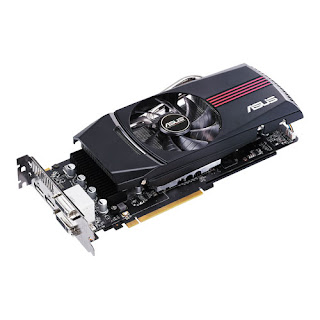
ASUS EAH6870, 1 GB


Going by AMD’s nomenclature, 6870 should be the most powerful single GPU followed by the 6850. But surprisingly, this is a mid-range GPU, which falls behind the 5870. The 6870 has 1120 stream processors (30 percent less than HD 5870) and runs at 900 MHz. The GDDR5 memory tied to a 256-bit wbus runs at 1.05 GHz, (150 Hz slower than HD 5870).

 Other changes in the HD 6000 include an improved tessellation engine that performs signifi cantly better at lower tessellation factors, better anti-aliasing, UVD 3, HDMI 1.4a and DisplayPort 1.2. UVD 3 supports hardware acceleration for Blu-ray 3D, MPEG-2, and DivX and XviD codecs. The EAH6870 uses AMD’s reference design, which is similar to that of the HD 5870 with an intake fan that cools the heatsink with copper pipes running through. The cooler is enclosed in a plastic shroud that creates a chamber for the air to move through the fins and expel from the rear, and a few vents on the side. The rear panel sports two DVI ports, two mini DisplayPorts and an HDMI port. The HD 6870 was just about able to handle Crysis Warhead at 1920x1080 using Enthusiast settings, but with AA disabled. Just Cause 2 was relatively easy to handle with Very High settings and AA set to 8x.

 So you can rest assured that most of the latest games will run comfortably at full HD resolution with all the settings maxed out, but with AA disabled or set to lower values. The overall performance is good. It’s slightly more powerful than the GTX 470, but it takes a beating from the HD 5870, which is 12 percent faster. Our system power consumption went down by 12 percent when using HD 6870 instead of the HD 5870, but the idle power consumption dropped by a mere 2 Watt. Priced at Rs 17,500, the Asus EAH6870 off ers good value for money. Competing GPUs by Nvidia also deliver similar performance at the same price point, but the power consumption is slightly higher.

ZOTAC GEFORCE GTX 580, 1.5 GB


The first retail sample of the GTX 580 was sent to us by Zotac. It sports the reference design with the core and memory running at stock speeds. Despite slower-switching transistors, the core of the GTX 580 runs 72 MHz faster than GTX 480 at 772 MHz. The 1.5 GB of GDDR5 memory tied to a 384-bit wide bus is clocked at 1.02 GHz, which is again faster by 96 MHz. The card draws power from an 8-pin PCIe power connector and a second 6-pin connector.

No change has been made to the video outputs on the rear, except that the mini HDMI port is version 1.4a. Zotac has bundled Prince of Persia: The Forgotten Sands with this card. So far, none of the single-GPU cards have been able to handle Crysis Warhead in Enthusiast mode at 1980x1080 with the AA maxed out. The GTX 580 just managed it at a steady 38 fps, which is smooth. The HD 5870 and GTX 480 could deliver a little over 30 fps at 4x AA. So 16x AA was out of question. Mafia II is another game that can bring high end graphics cards to their knees. At 1920x1080 with AA enabled and PhysX disabled, it ran very smoothly at 70.5 fps.

With PhysX on high, however, the car just about managed it at 36 fps, which is very commendable. Just Cause 2 didn’t show any signifi cant improvement. The GTX 580 shone in the Unigine Heaven 2.1 benchmark, which features extensive use of tessellation. At 1920x1080 with 4xAA and extreme tessellation, the scenes were running at 37 fps. Overall, the GTX 580 is 25 percent faster than its predecessor and consumes 80 W less at full load. It goes without saying that the GTX 580 is the fastest single-GPU card in the market at present. Take any game and max out all the eff ects and this card won’t give in easily. No other card comes close to the GTX 580, but a pair of HD 6870s, which would cost around the same would give it some serious competition.

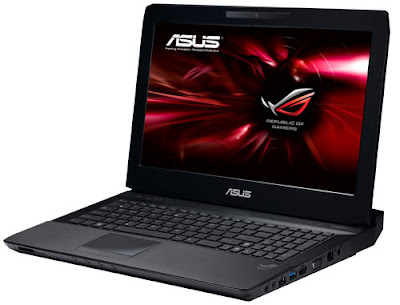
ASUS G53J


The G53J is another winner from Asus’ Republic Of Gamers series of laptops. It’s a mean machine in terms of hardware and looks, but it’s also more expensive than the  G51J. Aesthetics is one of the major distinguishing factors of this mammoth machine. With a rubberized all-black matte body and rugged build, the G53J looks more like a stealth aircraft. The surfaces are absolutely fl at, with no curves whatsoever. Typing on the chiclet keyboard is pretty comfortable, with the well-sized keys, touchpad and buttons.


The one downer was the poor quality of plastic in some places. Built around the Intel HM55 chipset, it is powered by an Intel Core i7 720 QM CPU, and has 8 GB RAM, two 750 GB hard drives, an Nvidia GTX 460 GPU and a 3D-ready 15.6-inch screen (1366x768). Other features are common to high-end machines, such as a Blu-ray combo drive, and standard connectivity options like Wi-Fi N, gigabit Ethernet and Bluetooth. It’s got all the necessary ports, such as a memory card reader, four USB ports, and HDMI and VGA ports. The machine also comes with the Nvidia 3D Vision kit, the receiver for which is built in. The benchmark scores and gaming experience lived up to our expectations, with much better 3D gaming performance than the G51J. The G53J ran at 25 fps in Crysis Warhead’s enthusiast mode, which is pretty good.

The overall gameplay on this machine is pretty much like it was in the G51J, with the added 3D performance. The G53J costs more than the G51J, but for the extra money, you get twice the RAM, an upgraded GPU, more space, and a built-in Nvidia 3D Vision receiver. And while the G51J looks pretty much like a gaming/multimedia laptop, the G53J is in a league of its own. So while the G51J costs about a lakh, the G53J gives you all these extras at Rs 1,12,499. If we were to spend around a lakh on a gaming laptop, we’d defi nitely get this one by paying that 10 percent extra.

ASUS EEEPC 1201N


The EeePC 1201N is not as slim or as light as the previous Seashell 1008HA netbook, which was merely an inch in thickness and weighed a kilogram. Nevertheless, at about 1.3-inches in thickness and weighing about 1.4 kg, this netbook packs more than double the power and off ers the same style and sexy looks. In fact, ergonomically, it’s much more comfortable to use, thanks to the larger 12-inch form factor. Typing on it is more convenient because the keys aren’t as crammed as they are on most netbooks. Except for the keys and the base, which feature a black matte coating, the entire unit has an overall glossy finish.


Ports are well-placed at either side and the built-in speakers are in the front, which isn’t the best thing. When using the machine placed on the lap, you might cover the speakers, which easily drowns out the sound.
In terms of features, it is the hardware that distinguishes this machine from all other netbooks. Built around Nvidia’s Ion platform, the Asus EeePC 1201N is powered by an Intel Atom N330 processor. It has 2 GB RAM, a 250 GB hard drive, GeForce 9400M integrated graphics, and a 12.1-inch glossy screen (1366x768). There’s no optical drive, but that’s not yet a downside on netbooks, Other features are rather common, such as HDMI and VGA ports, webcam, memory card reader and three USB ports.


Finally, the machine we tested came preloaded with Windows 7 Starter, but there are also variants that come with Windows 7 Home Premium. This netbook is twice as powerful in terms of processing and graphics when compared to entry-level netbooks. As a matter of fact, you can even enjoy light gaming on this machine, thanks to Nvidia’s Ion platform. In terms of multimedia, it can seamlessly playback HD-movies. The battery runtime under medium load is 3 hours 43 minutes, which isn't bad.But the Volume could have been better.

ROCCAT KONE+


The Roccat Kone+ is quite a large gaming mouse, but it feels extremely comfortable to use. Its rubberized body provides a fi rm grip and a much higher level of comfort. Both sides of the mouse are ergonomically carved out, allowing for better movement. Apart from the standard left and right buttons, the Kone+ consists of fi ve buttons and a 5-way scroll wheel. It also features a special button known as EasyShift+, which allows the user to double the overall functionality of the buttons. This means that you can assign two functions to a single button, giving the user a total of 24 unique functions via the 12 buttons.
However, this can only be done via the application provided with the product.

The application also comes with a Macro Manager that allows you to either redefine the already existing macros or create your own. Five control profiles are featured in the application to be used in accordance to the game type. Moreover, each profi le can be directly linked to three different games, thus allowing the set profiles to automatically load when you boot up a game. To further enrich your gaming experience, the Roccat Kone+ comes with a modular weight system that sits at the bottom. The supplied weights (four in total), each weighing 5 g, can be fit towards the bottom, thereby enhancing the overall precision and movement of the mouse.It costs around Rs:7,550 INR.It's Very Expensive when looking at its features.

TARGUS WIRELESS COMFORT LASER MOUSE


The Targus AMW51AP is an ergonomically designed wireless mouse that can be used with laptops as well as desktops. It features a 1200 dpi laser sensor that smoothens out movements and improves accuracy to a great extent. Moreover, its 2.4 GHz frequency gives it an operating distance of up to 33 feet. The mouse features a very lucid design, where the bottom half sports a soft rubberized layer that provides superior grip and comfort.
The top layer of the mouse, where your palm rests, is easily detachable as it is only held in place by three magnets. Here, you will fi nd a well designed retention system that holds the two AA batteries in place, while also securing the micro USB receiver within it. Flip the mouse over and you will find a battery life indicator that displays the amount of power left.It's little bit expensive at price of 1,775INR

Olive Pad


The OlivePad tablet is basically a large Android mobile, just like the iPad is essentially a large iPod Touch. It comes preloaded with Android 2.1, and there’s no difference in functionality between this and any high-end Android phone. Olive has incorporated a customized UI, so viewing media and email is a more streamlined. The 7-inch widescreen multi-touch display (capacitive) isn’t the sharpest, but typing is very comfortable.
A 3-megapixel camera is placed dead center at the rear, and a secondary front-facing VGA camera is provided for video calls. It has just 512 MB of internal storage, but a 16 GB microSD card is bundled. It also features a SIM (GSM or WCDMA supported) card slot.

It runs on a Qualcomm MSM7227 chipset with a 600 MHz processor, and the UI was mostly smooth, but buggy in places. The accelerometer isn’t responsive at all and pinch-zooming was not fl uid enough. The device is 3.5G-enabled (along with EDGE/ GPRS), along with Wi-Fi connectivity. You can also use its onboard GPS with Google Maps. This is a great piece of hardware for people who want to travel really light and still have access to the Internet wherever they are.At price of 25k,it is better that you buy Ipad.

FUJIFILM FINEPIX Z700EXR


The FinePix Z700EXR makes its presence felt with a slim full metal body and a full-sized touch interface. It comes with an acceptable 5x optical zoom, a standard 35 mm lens, and an effective resolution of 12 megapixels. Its 3.5-inch touch screen is responsive and accurate, and the dual direction GUI rotates to either portrait or landscape view. Apart from 15 scene modes, the Z700EXR features a film simulation mode. There is also a touch and- shoot function that lets you focus on the subject before shooting. Strangely, the manual mode doesn’t allow the aperture or shutter speed to be changed.
You do, however, get to change basic settings like ISO, white balance and exposure. The Z700EXR also comes with an image search feature, allowing you to search by date, face, scene, or data type. The camera can record video at 1280x720 (720p). However, the overall performance suff ers. There are panning issues, colors appear dull, and the camera has no control over the contrast. For still images, however, the Z700EXR does well
in maintaining color and saturation. Color is neither too vivid, nor too dull, but there is some color bleeding evident. There is a certain amount of loss in sharpness when it comes to capturing finer details, but overall sharpness is well maintained. Night shots are good too, but nothing to write home about. The Z700EXR’s macro range is a real disappointment, with a minimum shooting distance of 5.5 cm.
The camera takes decent still images, but fails in terms of video recording. With a price tag of Rs 13,999, it’s not a camera we would recommend, as the Sony DSC-W360 and DSC-W380 perform at almost the same price.